Keyboard PCB: The Core Technology Behind Mechanical Keyboards
Mechanical keyboards have become increasingly popular among gamers, programmers, and hardware enthusiasts. While switches and keycaps often attract the most attention, the real foundation of any mechanical keyboard is the Keyboard PCB.
A Keyboard PCB (Printed Circuit Board) is responsible for detecting every key press, processing signals, and enabling advanced features such as RGB lighting, macros, and wireless connectivity. Without a well-designed PCB, even the best switches cannot deliver a reliable typing experience.
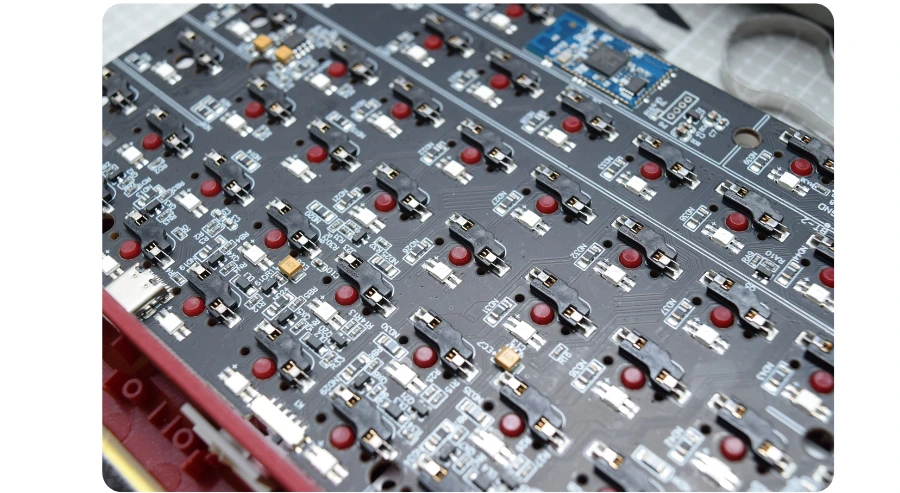
What Is a Keyboard PCB?
A Keyboard PCB is a custom-designed circuit board that connects all key switches and converts physical key presses into digital signals that computers can understand. Each switch is positioned on the PCB and connected through a matrix of electrical traces.
If you want a deeper look at how mechanical keyboard PCBs are designed and manufactured, you can refer to this detailed guide:
👉 https://hilpcb.com/en/blog/mechanical-keyboard-pcbs/
This resource explains keyboard PCB structures, materials, and production processes from a professional PCB manufacturing perspective.
Key Components of a Keyboard PCB
A modern Keyboard PCB is made up of several critical components:
1. Switch Matrix
The matrix consists of rows and columns of copper traces. When a key is pressed, the circuit closes at a specific intersection, allowing the controller to detect the key accurately.
2. Microcontroller Unit (MCU)
The MCU scans the switch matrix and communicates with the host device. Popular keyboard MCUs support:
USB HID communication
High polling rates
Open-source firmware such as QMK, VIA, and VIAL
3. Diodes
Diodes prevent ghosting and enable N-key rollover (NKRO), ensuring multiple simultaneous key presses are registered correctly.
4. Hot-Swap Sockets or Solder Pads
Hot-swap Keyboard PCB: Allows switches to be replaced without soldering
Soldered Keyboard PCB: Offers higher durability and more flexible layout options
5. USB or Wireless Interface
Most Keyboard PCBs use USB-C, while advanced designs may include Bluetooth, 2.4 GHz wireless modules, and battery charging circuits.
6. RGB and Backlight Circuitry
RGB-enabled Keyboard PCBs integrate LED drivers and power management systems to support per-key RGB or underglow lighting effects.
Why Keyboard PCB Design Is So Important
The quality of a Keyboard PCB directly affects keyboard performance and reliability.
Signal Speed and Latency
Trace routing quality, MCU performance, and firmware optimization determine scanning speed and input latency—crucial for gaming keyboards.
Layout Compatibility
Keyboard PCBs define supported layouts such as:
60%
65%
75%
TKL
Full-size
Some advanced PCBs support multiple layouts through flexible footprints.
Customization and Firmware Support
With open-source firmware, users can:
Remap keys
Create macros
Customize RGB effects
Define layers and shortcuts
Durability and Manufacturing Quality
High-grade materials, precise drilling, and reliable surface finishes ensure long-term stability under millions of key presses.
Types of Keyboard PCBs
Rigid Keyboard PCB
The most common type, typically made from FR-4 material. It offers excellent strength, stability, and cost efficiency.
Flexible and Hybrid PCB
Used in low-profile or ergonomic keyboards, combining rigid and flexible sections for innovative designs.
Multi-Layer Keyboard PCB
2-layer PCB: Suitable for standard keyboards
4-layer or higher: Preferred for RGB, wireless, and high-speed signal designs
Keyboard PCB Manufacturing Considerations
When producing a Keyboard PCB, manufacturers focus on:
Copper thickness and trace width
Surface finishes such as ENIG or HASL
Tight tolerances for switch alignment
Electrical testing for signal reliability
Professional manufacturers with experience in keyboard PCB production can significantly improve yield and product consistency.
The Role of Keyboard PCB in DIY Mechanical Keyboards
DIY mechanical keyboards rely heavily on PCB design. A typical build process includes:
Choosing the right Keyboard PCB
Matching the PCB with a compatible case and plate
Installing switches (hot-swap or soldered)
Flashing firmware
Customizing key mapping and lighting
The PCB determines how flexible, beginner-friendly, and upgradeable the keyboard will be.
Future Trends in Keyboard PCB Technology
The future of Keyboard PCB development includes:
Wireless and ultra-low-power PCB designs
Higher polling rates for esports keyboards
Integrated rotary encoders and displays
Smarter RGB synchronization
Environmentally friendly PCB materials
As customization demand grows, Keyboard PCBs continue to evolve toward higher performance and greater flexibility.
Conclusion
A Keyboard PCB is the true heart of a mechanical keyboard. It defines performance, customization potential, durability, and user experience. Whether you are a keyboard enthusiast, product designer, or PCB manufacturer, understanding Keyboard PCB technology is essential.
For a more in-depth technical overview, be sure to check out this comprehensive guide on mechanical keyboard PCBs:
👉 https://hilpcb.com/en/blog/mechanical-keyboard-pcbs/

